Teknoloji Gunlugu

Blog


Dell EMC VxRail Installation

In This article, I will talk about prerequisites, installation and basic issues for VxRail installation.

When I created the this document, the VxRail version was 4.5.300. Therefore, it may differ with the current version. (Adding new nodes, ESRS installation, etc.)

Requirements (General)

Step Definition
1 Complete physical installations of Servers and Switches.
2 Do the IDRAC and Switch BMC wiring.
4 One cable from server to Tor Switch A, the second cable is to Tor Switch B.
5 Connect Tor Switches in the customer network and configure them as a stack, making sure there are no LACP on it.
3 Create the corresponding VLANS on Top-Of-Rack (Tor) Switches to be used for the VxRail.
6 Enable IPv4 and IPv6 multicast for the Management VLAN and IPv4 multicast for the vSAN VLAN.
6 Create forward and reverse DNS records for ESXi, VCenter, and Log Insight and make sure they are resolved.
7 Make sure the Customer network is accessible. (AD, DNS, Proxy, etc.)
8 Ensure that the ESXi servers and the NTP server show the same time, if necessary, fix the time via the IDRAC and ESXi host.
10 Tagged or Untagged traffic from Tor Switch ports connected to Vxrail are allowed, decide by structure.
11 Allow all traffic to pass through ports used in connection between all switches, including IPv4 and IPv6 multicast if Multiple switches are in use.
Optional Check that the EMC support account is correct.
Optional Make sure that the Switches connected to the BMC and the IDRAC support 100Mbps.


Dell EMC VxRail Kurulumu

Bu yazıda VxRail kurulumu için ön gereksinimler, kurulum ve temel sorunlardan bahsedeceğim.

Kurulum dokümanını oluşturduğum zaman VxRail sürümü 4.5.300‘dü. Dolayısıyla güncel sürümle farklılıklar gösterebilir. (Yeni node ekleme, ESRS kurulumu vs)


Gereksinimler (Genel)

Adım Tanım
1 Sunucuların ve Switch’lerin fiziksel montajlarını tamamla.
2 IDRAC ve Switch BMC kablolamasını yap.
4 Her  sunucu üzerinden bir kablo Tor Switch A, ikinci kablo Tor Switch B’ye olacak şekildek kablola.
5 Tor Switch’leri müşteri ağında sonlandır ve stack olarak yapılandır,üzerinde LACP olmadığından emin ol.
3 VxRail için kullanılacak Top-Of-Rack (Tor) Switch’ler üzerinde ilgili VLAN’ları oluştur.
6 Management VLAN için IPv4 ve IPv6 multicast, vSAN VLAN için IPv4 multicast’i aktif hale getir.
6 ESXi, VCenter ve Log Insight için forward ve reverse DNS kayıtlarını oluştur ve çözüldüğünden emin ol.
7 Müşteri ağının erişilebilir olduğundan emin ol. (AD, DNS, Proxy vb.)
8 ESXi sunucular ve  NTP sunucusunun aynı zamanı gösterdiğinden emin ol, gerekirse IDRAC ve ESXi host üzerinden zamanı düzelt.
10 Vxrail’e bağlı Tor Switch portlarından Tagged ya da Untagged trafik geçebilir, yapıya göre karar ver.
11 Çoklu switch kullanımı varsa IPv4 ve IPv6 multicast de dahil olmak üzere tüm switch’ler arası bağlantıda kullanılan portlardan bütün trafiğin geçmesine izin ver.
Opsiyonel EMC destek hesabının doğru olduğunu kontrol et.
Opsiyonel BMC ve IDRAC’e bağlı olan Switch’lerin 100Mbps desteklediğinden emin ol.


Dell EMC VxRail

Bir süredir yazmayı düşündüğüm, gerek yoğunluk gerek sağlık sebeplerinden vakit bulamadığım bir ürün VxRail.

Öncelikle vSAN altyapısına üç şekilde sahip olabilirsiniz.

  1. Uygun donanımları kendi imkanlarımızla edinmek
  2. vSAN Ready Node almak
  3. VxRail almak

İlk iki adıma baktığımızda donanım ve yazılım uyumuna VMware Compatibility Guide‘a bakarak dikkat edilmesi gerektiğini farketmişsinizdir, kimileri için karmaşık ve hataya açık olabilmekte bu süreç.

Elinizdeki ürünleri üreticilerin sınırlarında kullanmak istiyorsanız, mevcut yazılımları en hızlı şekilde deneyip geçiş yapmak istiyorsanız VxRail size çok da uygun bir ürün değil.

Peki kimlere uygun bu VxRail;

  1. Uyumluluk açısından kafasında soru işareti kalmasını istemeyen,
  2. Ürünün en iyi şekilde yapılandırıldığına emin olmak isteyen,
  3. BT ekibinde sınırlı çalışanı olan,
  4. Bakım tarafını tek üretici üzerinden çok kolay şekilde yönetmek isteyen.

Yukarıdaki kriterlere uygun bir firmaysanız aradığınız ürünü buldunuz.

VxRail hem hibrit hem de all-flash olarak edinilebilmekte.

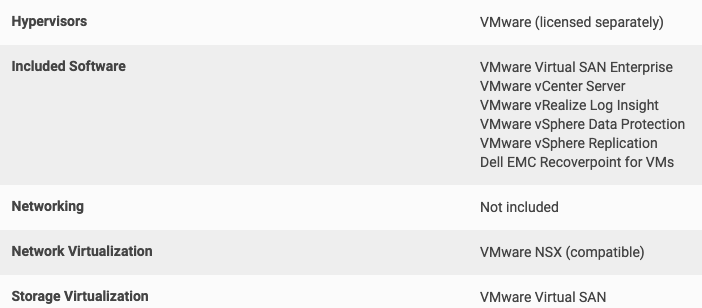
Aşağıda görüldüğü gibi VMware lisanslarını ürünle birlikte alabileceğiniz gibi, mevcut lisanslarınızı da kullanma imkanına sahipsiniz.

Sadece VxRail yönetimi için kullanılacaksa vCenter‘da ücretsiz olarak gelmekte.

EMC Secure Remote Services (ESRS) aracılığıyla altyapınız üretici tarafından düzenli olarak sorunlara karşı izlenir ve gerektiğinde hızlı destek sağlanır.

vRealize Log Insight ile ortamın detaylı loglarını inceleyebilir, Recoverpoint for VM ile sanal sunucularınızı replike ederek koruyabilirsiniz.

Dell EMC Data Protection Suite yazılımını ürün ile birlikte maliyeti sizi üzmeyecek şekilde edinebilir ve veri koruma ürünlerinizi vCenter ile entegre çalışacak şekilde kullanabilirsiniz.

vSan, ağ altyapısı üzerinden çalıştığı için yedekli şekilde çalışacak switch ihtiyacınız olduğunu da belirtelim.


VxRail tümüyle vSan altyapısına sahip olmasına karşın stabilite ve uyumluluktan taviz vermemek için yenilikleri  1 – 1.5 ay kadar geriden takip etmektedir.

VxRail 4.5 ve öncesinde VxRail Manager ayrı arayüze sahip ayrı bir ürün olarak kullanımdaydı, dolayısıyla yönetim fonksiyonları zorlayıcı olabilmekteydi.

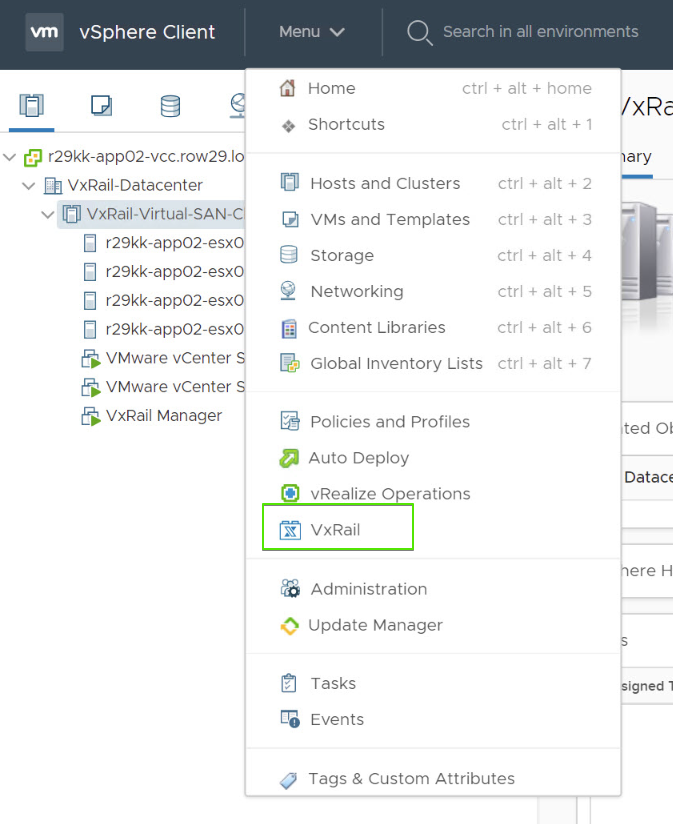
Aşağıda görülebildiği üzere Vxrail 4.7 itibariyle Vxrail Manager aracı artık vCenter‘ın altında çalışmakta ve yönetim operasyonları için VMware bilgisi harici gereksinime ihtiyaç kalmamıştır.

Güncellemeler VxRail altyapısı internete bağlı ise doğrudan indirilebilmekte, değilse support.emc.com adresinden indirilip lokal olarak yapılabilmektedir.

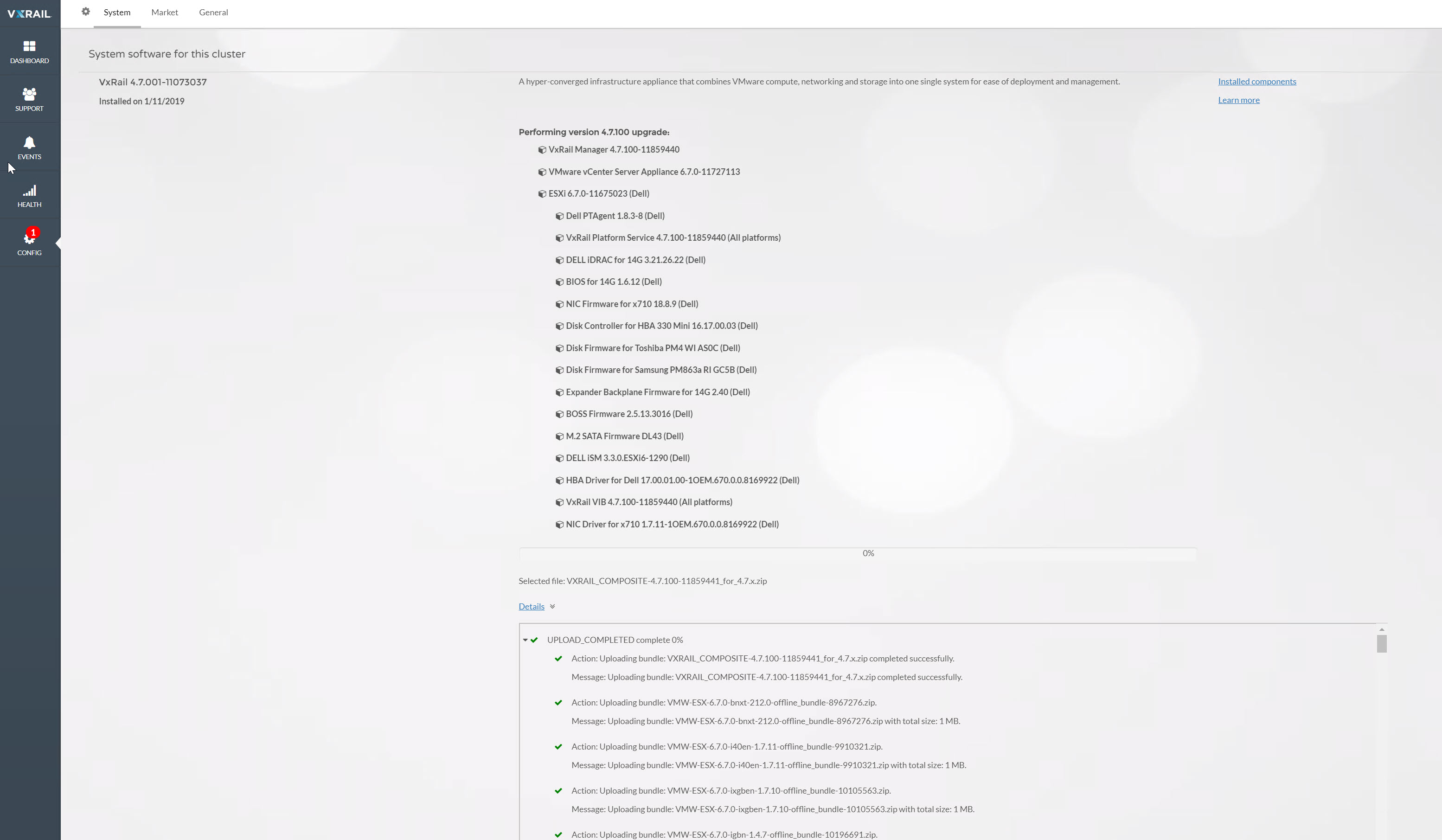
Aşağıda görülebildiği üzere güncelleme hem firmware, hem VMware hem de donanım sürücülerini kapsamaktadır.


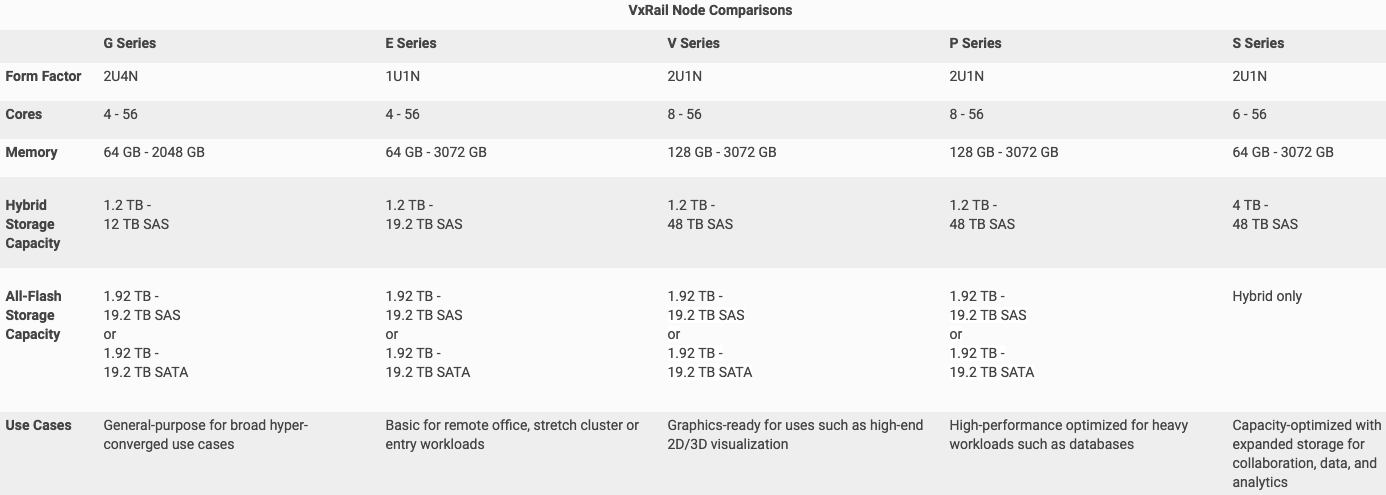
Nisan 2019 itibariyle aşağıdaki çözümler Dell EMC‘nin sitesinde belirtilmekte ancak bir süredir G serisinin Türkiye’ye gelmediğini bilmekteyiz.

Sonraki makalede kurulum tarafını anlatmaya çalışacağım, dokümana buradan erişebilirsiniz.


Dell EMC VxRail

VxRail is the product that I’ve been thinking about writing for a while but I didn’t have time for health and business reasons so far.

First, you can have your vSAN infrastructure in three ways.

  1. To obtain the Appropriate equipment with our own facilities
  2. Get vSAN Ready Node
  3. Get VxRail

When looking at the first two steps, you may have noticed that hardware and software compatibility should be taken into account to be aware of problems thus this process can be complex and error-prone to some.

If you want to use dive deeply to the products and force their limits or to try to switch to the most recent software, VxRail is not a very convenient product for you.

So who is this VxRail suitable for?

  1. Someone who does not want to keep a question mark on the head for compatibility,
  2. Someone who wants to make sure that the products are configured in the best way,
  3. Someone with limited employees in the IT team,
  4. Someone who wants to cover maintenance very easily.

If you are a company that meets the above criteria, you have found the product.

VxRail can be acquired both as hybrid and all-flash.

As shown below, you may buy the VMware licenses with the product, or you can use your existing licenses as well.

It is available  free usage of vCenter when used only for VxRail management.

Through EMC Secure Remote Services (ESRS), your infrastructure is monitored regularly for problems by the manufacturer and you get fast support when needed.

With vRealize Log Insight, you can examine the detailed logs of the environment and protect your virtual servers by replicating them with Recoverpoint for VM.

You can obtain Dell EMC Data Protection Suite software bundling with the product in a way that does not upset you and use your data protection products in an integrated way with vCenter.

As vSan runs through the network infrastructure thus you also need switches that will work in a redundant manner.

Although VxRail has a complete vSan infrastructure, it follows innovations from 1-1.5 months behind to avoid compromising stability and compatibility.

VxRail Manager was in use as a separate product with a separate interface, so management functions could be compelling in VxRail 4.5 and earlier.

As of Vxrail 4.7, the Vxrail Manager tool is now running under the vCenter and requires no additional VMware knowledge for management operations.

Updates can be downloaded directly if the VxRail infrastructure is connected to the Internet, if not you can download via support.emc.com  and make local update.

As can be seen below, the update covers firmware, VMware and hardware drivers.

As of April 2019, the following solutions are stated on Dell EMC‘s site, but we know that the G series has not been in Turkey for some time.

In the next article I will try to explain the installation side, you can access the document here.


VMware vSAN Kapasite Hesaplama

Yeni bir vSAN yatırımı yapmadan önce doğal olarak ihtiyaçlarınız ve bu ihtiyaçları hangi donanımlar ile giderebileceğinizi görmek istersiniz.

Bu işlemleri otomatik olarak gerçekleştirebileceğiniz aşağıda bağlantılarını paylaştığım çeşitli üretici araçları da mevcut.

vSAN ReadyNode Sizer için burayı ve VxRail Xpress Sizer için burayı tıklayabilirsiniz.

Peki bu araçlara bağlı kalmadan kendiniz ortalama bir hesaplama yapmak isterseniz ne yapmalısınız ?


VMware vSan Capacity Sizing

You will naturally like to see what equipment you need and what enhancements you can make with these needs before you invest for a new vSan Environment

There are several manufacturer tools that I share links with below that you can perform automatically.

Click here for vSan Readynode Sizer and here for Vxrail Xpress Sizer.

So what should you do if you want to do an average calculation without having to depend on these tools?


VMware vSAN Stretched Cluster

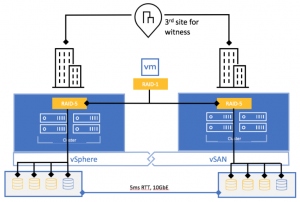
vSAN Stretched Cluster (SC) provides business continuity in multiple failure situations like Fault Domains. Data is written simultaneously to two separate locations, the first location is called Preferred and the second one is called Secondary. If one of the locations is lost, the virtual machines restarts at the second location by using VMware HA, where all fresh data exists.


VMware vSAN Stretched Cluster

vSAN Stretched Cluster (SC), Fault Domain‘de olduğu gibi çoklu arıza durumlarında iş sürekliliği sağlar. Mevcut veriler iki ayrı lokasyona eş zamanlı şekilde yazılır, bu lokasyonların birincisi sanal makinelerin çalıştığı Preferred ve ikincisi ise adından anlaşılacağı gibi Secondary‘dir. Lokasyonlardan birinin yitirilmesi durumunda aktif verilerin tamamı ikinci lokasyonda olduğu VMware HA aracılığı ile sanal makineler ikinci lokasyonda ayağa kalkar.


VMware vSAN Fault Domain

In this article I will explain the subject of vSAN Fault Domains. You can review the original source here.

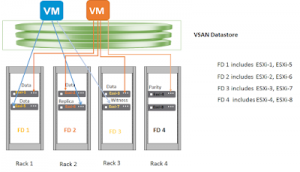
Fault Domains allow systems to run in cases where multiple server failures or a cabinet is not reachable by spreading the vSAN cluster across multiple cabinets or blade chassis. One or more servers can be added to each Fault Domain.


VMware vSAN Fault Domain

Bu yazımda vSAN Fault Domain konusunu açıklayacağım. Özgün kaynağı buradan inceleyebilirsiniz.

Fault domain mekanizması vSAN kümesini birden çok kabinet ya da blade şasiler üzerinde yayarak, aynı anda birden çok sunucu arızası ya da bir kabinetin tamamen erişilemediği durumlarda sistemlerin çalışmasına olanak sağlar. Her bir Fault Domain‘e bir ya da birden fazla sunucu eklenebilir.